

How do I use Easy Banking Business Mobile?
Easy Banking Business Mobile has expanded its range of services with features specifically designed for business credit card holders. This option is ideal for employees who have a credit card provided by their company. So you don't need to have an Easy Banking Business account as an individual or as a legal entity to access your business credit card information.
How do I register?

For the time being, registration is done exclusively via itsme®. Make sure you have a Belgian identity card linked to itsme® or an itsme® account activated with a Belgian bank. For more information on installing and using itsme®, visit their website
What is Easy Banking Business Mobile for business credit card holders?
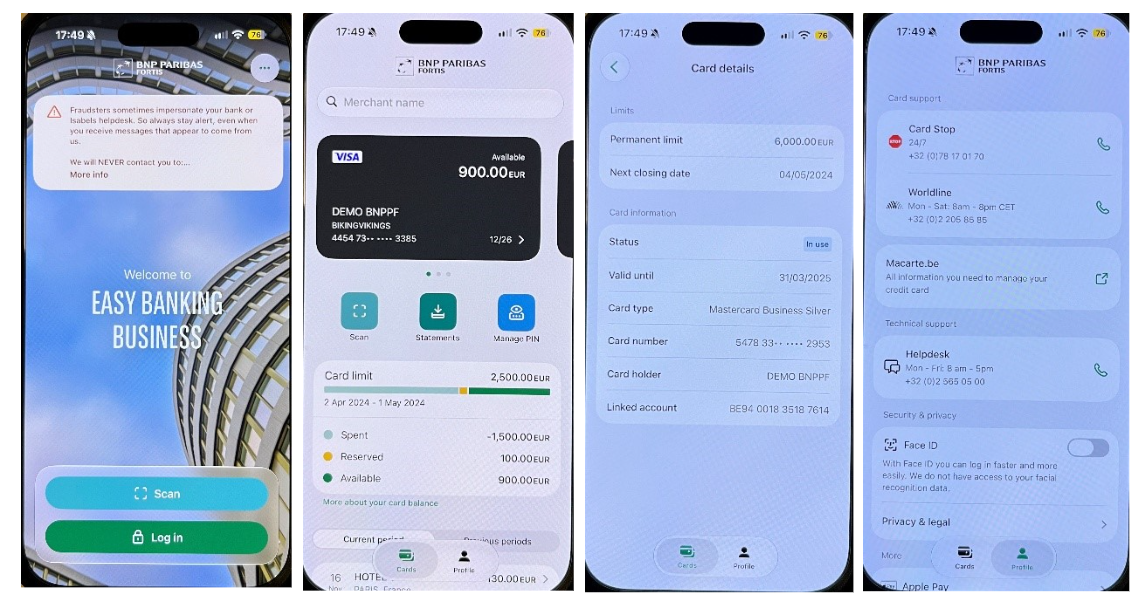
Easy Banking Business Mobile lets you manage your business credit card efficiently:
- Check the card’s status and details, as well as the employer’s monthly limit and available balance.
- Track transactions, divided into the current period and previous periods. A search function is also available, allowing you to search specifically by amount, period or currency. You can search for transactions dating back up to 10 years.
- Contact customer service directly in the event of fraud or to block your card (via Card Stop).
- Download expense statements for the past 18 months (PDF file).
- PIN card management: You can view the PIN code or, if it is blocked, unblock it (and view it).
If you already have access to Easy Banking Business Mobile, you’ll continue to use these features as usual. Learn more here.
How do I log in to Easy Banking Business Mobile?
1. Download the app and open it. Download for iOS or download for Android.
2. Click on 'Start'.
3. Enter your mobile phone number linked to your itsme® account and follow the instructions.
If you're not a customer of the bank, you'll need to enter the credit card number. Existing customers will be able to move directly to the next step.
4. Read and accept the general terms and conditions.
5. Select identification via itsme® and confirm.
6. Confirm the login via the SMS you received.
7. Create a 5-digit PIN for your future logins.
You're now ready to explore all the features of Easy Banking Business Mobile for business credit card holders!