

Recognise and prevent phishing: protect yourself against online fraud
In phishing, criminals impersonate trusted organisations to obtain your personal and/or banking details, with the ultimate aim of emptying your bank account. To recognise phishing and protect yourself against it, it is therefore essential to watch out for warning signs. Discover them in this article and follow our tips.

In a nutshell:
- How can you recognise phishing?
- Which warning signs indicate fraud?
- Which good habits can help you?
- What BNP Paribas Fortis will never ask you.
- What to do if you have fallen victim.
Online fraudsters typically send an urgent-sounding email or text message containing a link to a website that is almost identical to the real thing. If you click on a suspicious link in a phishing message and enter your details, you give fraudsters direct access to your bank and other accounts, including email and social media, with all the negative consequences that entails. Stay alert and adopt the right reflexes to better protect yourself against all forms of phishing.
Phishing: the most common form of online fraud
The figures speak for themselves: in 2024, around €49 million was stolen through phishing in Belgium, €9 million more than the previous year. In 2025, Safeonweb received nearly 10 million reports of suspicious messages.
By creating a sense of urgency or fear, fraudsters manipulate their victims until they obtain their details and can steal from them. Do not fall into their trap. Learn how to recognise this type of fraud and protect yourself against it. The most common forms of phishing – from fake emails and WhatsApp messages to fraud via text message, phone and misuse of QR codes – are outlined below.
What types of phishing exist?
Phishing is a fraud technique in which criminals usually impersonate an official organisation – such as a bank, a government body or an energy provider – to mislead you. Their objective is clear: to obtain personal data (national register numbers, identity card numbers, mobile numbers), banking details (card numbers, CVV codes, PIN codes) or login credentials.
They exploit human emotions such as urgency, fear and trust. They create time pressure so that you don’t take the time to think and therefore do what they want. They often also threaten fines or blocked accounts.
Although online fraudsters most commonly “phish” via fake emails, there are several variants. Below are the most common forms:
Phishing (e-mail fraud)
The original form is e-mail fraud. Scammers send fake e-mails that appear to come from a legitimate organisation. Typically, these phishing emails use an urgent tone (e.g. “Your account will be blocked within 24 hours”) and include suspicious links to fake websites where you are asked to provide your details. This method is popular because fraudsters can send thousands of emails at once.
Vishing (telephone fraud)
In vishing, the 'v' stands for voice. Fraudsters call you, pretending to be bank employees, Card Stop or the police. Using false pretences (e.g. 'Your account has been hacked, you must act immediately'), they manipulate you into sharing personal data, PINs or access codes. They may also ask you to install 'problem-solving' software that gives them access to your computer or phone. Vishing can be very convincing because personal contact builds trust. Fraudsters may even spoof phone numbers to make it appear as though they are calling from an official number.
Smishing (SMS fraud)
Smishing involves sending phishing messages via text or messaging apps such as WhatsApp. These messages appear to come from your bank or another trusted organisation, but they lure you to a fraudulent website via a suspicious link. They often have an urgent tone (e.g. 'Pay an outstanding invoice immediately') and are unexpected.
Quishing (QR code fraud)
The latest variant is 'quishing', which is fraud involving QR codes. Scanning a fake QR code may redirect you to a phishing site, or malware may automatically be installed on your device. Fraudsters distribute these malicious QR codes via email or text message, but they also place them physically in public places. For example, in public places such as car parks, electric vehicle charging points or payment terminals, they may place stickers with fake QR codes over genuine ones. They exploit people's familiarity with and reliance on QR codes to mislead them.
Phishing at home (including fake bank employees)
A recent trend involves individuals posing as bank or police employees and visiting people's homes to collect bank cards and codes under the pretext of 'preventing damage'. This is usually preceded by a vishing call, during which the fraudsters convince the victim that they have been targeted by fraudsters. These criminals may also take other valuable items, claiming that they will keep them safe, for example, in the bank's vault. No bank would ever do this.
How can I recognise phishing and protect myself against it?
Recognising fraud is your first line of defence. What should you look out for to immediately identify a suspicious message, fraudulent text or dubious phone call?
Take a look at some recent examples of fake messages and familiarise yourself with the warning signs below to help protect yourself against online scams.
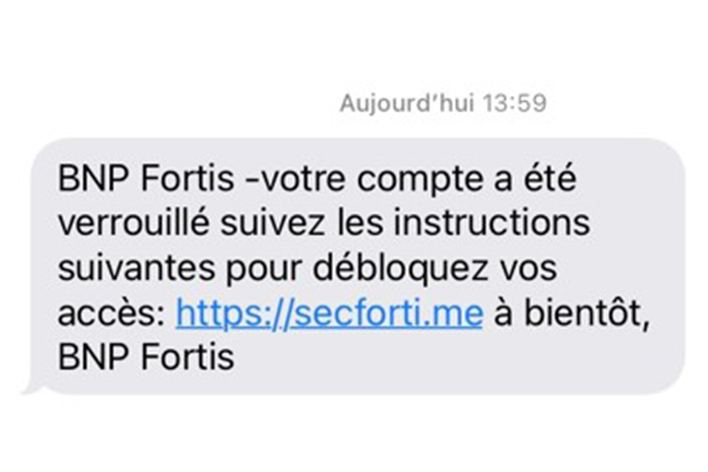
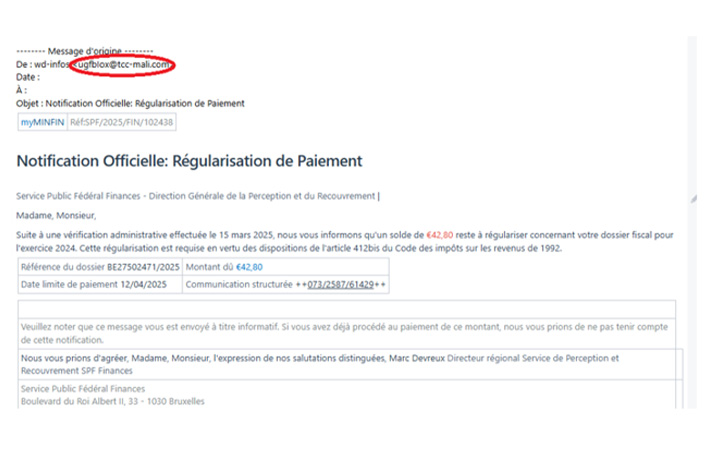
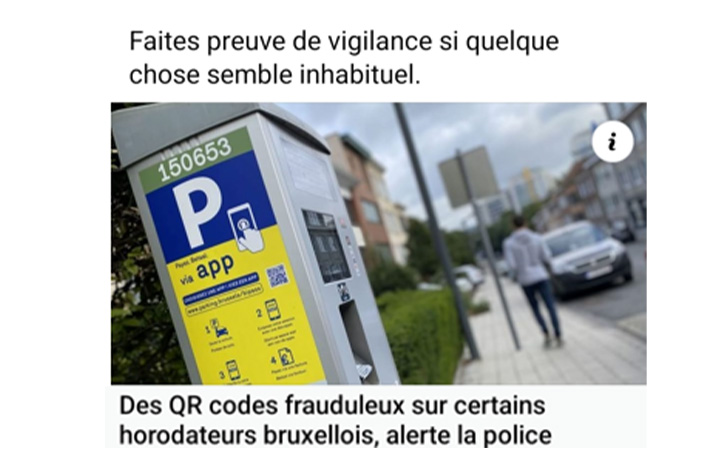
Warning signs of online fraud
- Urgent action required: pressure to act quickly, such as being told to "urgently pay an outstanding invoice" or "provide your PIN or your bank cards will be blocked". If you receive such a message unexpectedly or for no apparent reason, exercise extreme caution. If you are in any doubt, contact the bank or company directly via official channels.
- Unusual sender: the email address looks suspicious, or the domain after the '@' symbol does not match that of the official organisation. Always check that it is legitimate. Pay close attention to the domain name and watch out for spelling errors. Make it a habit to hover your cursor over the sender’s address. If it looks strange, it may be spoofed.
- Untrustworthy links: the link does not lead to the official website when you hover over it without clicking. Everything after the protocol in a URL (http:// or https://) and before the first slash (/) constitutes the domain name. Watch out for irregularities and suspicious paths after the first slash.
- Generic greeting: the message uses a generic greeting, such as 'Dear customer', or no greeting at all.
- Language and spelling errors: thanks to artificial intelligence (AI), phishing messages are becoming more sophisticated and contain fewer mistakes. However, you may still spot awkward phrasing, spelling errors or odd translations.
- Suspicious attachments: be cautious of unexpected emails containing attachments that may carry viruses, especially those with extensions such as .exe, .zip, .js or .scr.
- Unexpected calls: fake bank employees may call you to ask you to install software or provide passwords and codes to “resolve” an urgent issue. Be especially cautious if you receive an unexpected call.
- Requests for personal data: be vigilant if you are asked to share codes, passwords, account numbers, card numbers or other personal information. Never share such details via email, text message, phone or with so-called “bank employees at home”. Your bank and official organisations will never ask for this.
- Requests to install software: fraudsters may ask you to install software to solve an alleged problem, but it is actually malware that gives them access to your device.
Essential reflexes to protect yourself against online fraud
- Always check the sender and URLs — hover over the email address or link without clicking to see where it leads.
- Never click on links or open attachments in suspicious emails — type the website address directly into your browser or use a saved favourite.
- Log in via the official website or app — never use links in emails, even if they look genuine. Do not enter personal data on suspicious websites.
- Do not share personal information via unsecured channels — never provide PIN codes, passwords, or personal or banking details via email, text message, or phone.
- Never install software on request — no matter how urgent the request may seem.
- Stay calm if you are contacted unexpectedly — take time to verify the request. End the call and contact the organisation yourself using the official contact details. Block suspicious numbers.
- Do not let unknown individuals into your home, and never hand over cards or codes — always verify identities through official channels.
- Report suspicious messages — forward them to suspect@safeonweb.be. You can also download the Safeonweb app from official app stores to receive alerts about new phishing attempts.
What BNP Paribas Fortis will never do
Your bank will NEVER ask you to:
- Provide your card PIN, the 3-digit CVV code on the back of your card, or your Easy Banking App or Easy Banking Web access codes
- Share codes received via SMS or generated with your card reader or itsme®
- Install software to allow remote access to your devices
- Confirm or cancel a transaction by phone or via itsme®
- Transfer money to a so-called secure account
Our staff will also NEVER visit your home to collect your bank cards, card readers, codes, smartphones or any other items.
Have you fallen victim of fraud?
- Contact the Easy Banking Centre (Mon–Fri 7am–10pm, Sat 9am–5pm) on +32 2 762 90 00.
- Call Card Stop immediately on 078 170 170 to block all your bank cards or block your debit card(s) via Easy Banking App.
- Outside Easy Banking Centre hours and only in case of suspected fraud, call +32 2 433 43 80.
- Report the incident to the police (following Febelfin guidelines) and provide a copy of your statement to your BNP Paribas Fortis branch or a post office.
- Check via Easy Banking App (Settings > Security > Devices with our apps) or Easy Banking Web (Settings > Access to our apps) which devices have your banking app installed and remove any suspicious or unknown devices.
- For more information, visit Safeonweb.be, the Belgian financial sector federation and the Centre for Cyber Security Belgium.
Stay alert
Phishing continues to evolve, but with the right knowledge and vigilance, you can protect yourself against it. Recognise the warning signs and adopt the essential reflexes to guard against this common form of online fraud.
More information?
Discover all our tips to recognise and prevent online fraud.